See how your retirement could be paid for, year by year
Bring your pensions, savings, State Pension and spending into one saved retirement plan. See how each year could be funded, explore retiring earlier or spending more, and update your figures as life changes.
Launch price £30 a year while your membership remains active. Standard price £60. Equivalent to £2.50 a month, billed annually. Start with a 7-day free trial. No card needed.
Planning figures only. Not financial advice.
Plan Hub is built by Ryan, founder of Retirement Calculators. After selling an online education business in 2021, he wanted one place to see pensions, ISAs and property income together, and built the tools he could not find. Each release is checked against a set of example plans, and tax figures against the current year’s rates.
How the model works and what it leaves outA calculator answers one question. A plan keeps answering them.
Most people can run a pension calculator once. The hard part is keeping the whole picture straight when a statement arrives, markets move or your stop-work date changes.
Numbers in five places
Workplace pension on one website, ISA on another, State Pension forecast somewhere in your inbox.
Every what-if starts from scratch
Retire two years earlier? Spend a bit more? You rebuild the sums each time and lose the version you had.
No way to see progress
Last year’s “probably fine” fades. There is nothing to compare this year against.
Three steps to a plan you can keep
Start with the figures you know today. The plan gets more useful each time you come back to it.
Add your figures
Five short steps: about you, spending, pensions, savings, review. Rough numbers are fine to start.
See each stage of retirement
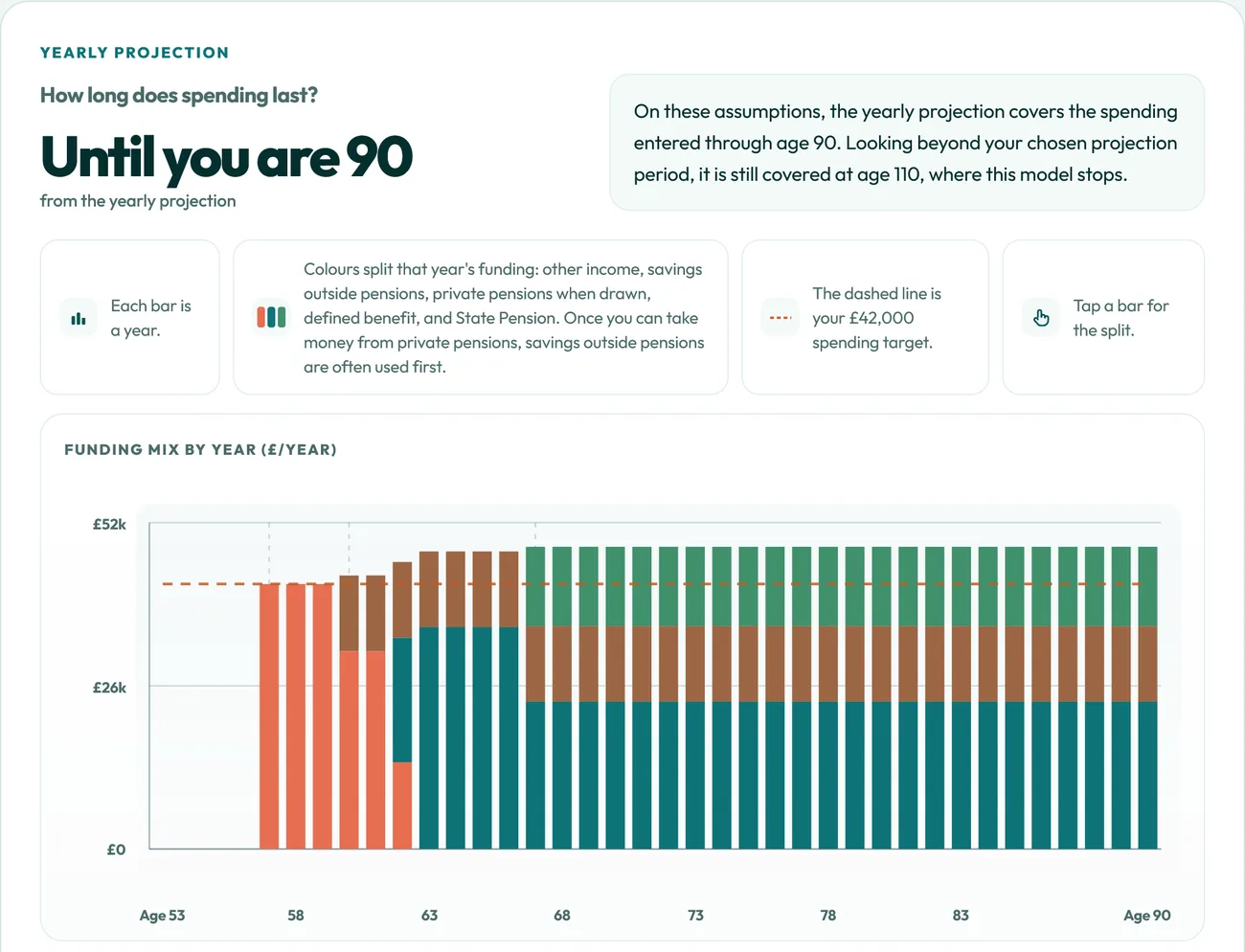
The yearly projection shows which pots could fund each year, when your pensions start and how long your money could cover your spending.
Check in and test changes
Record a check-in when a statement arrives. Try a different stop-work age or spending level without touching your saved plan.
Explore your retirement plan.
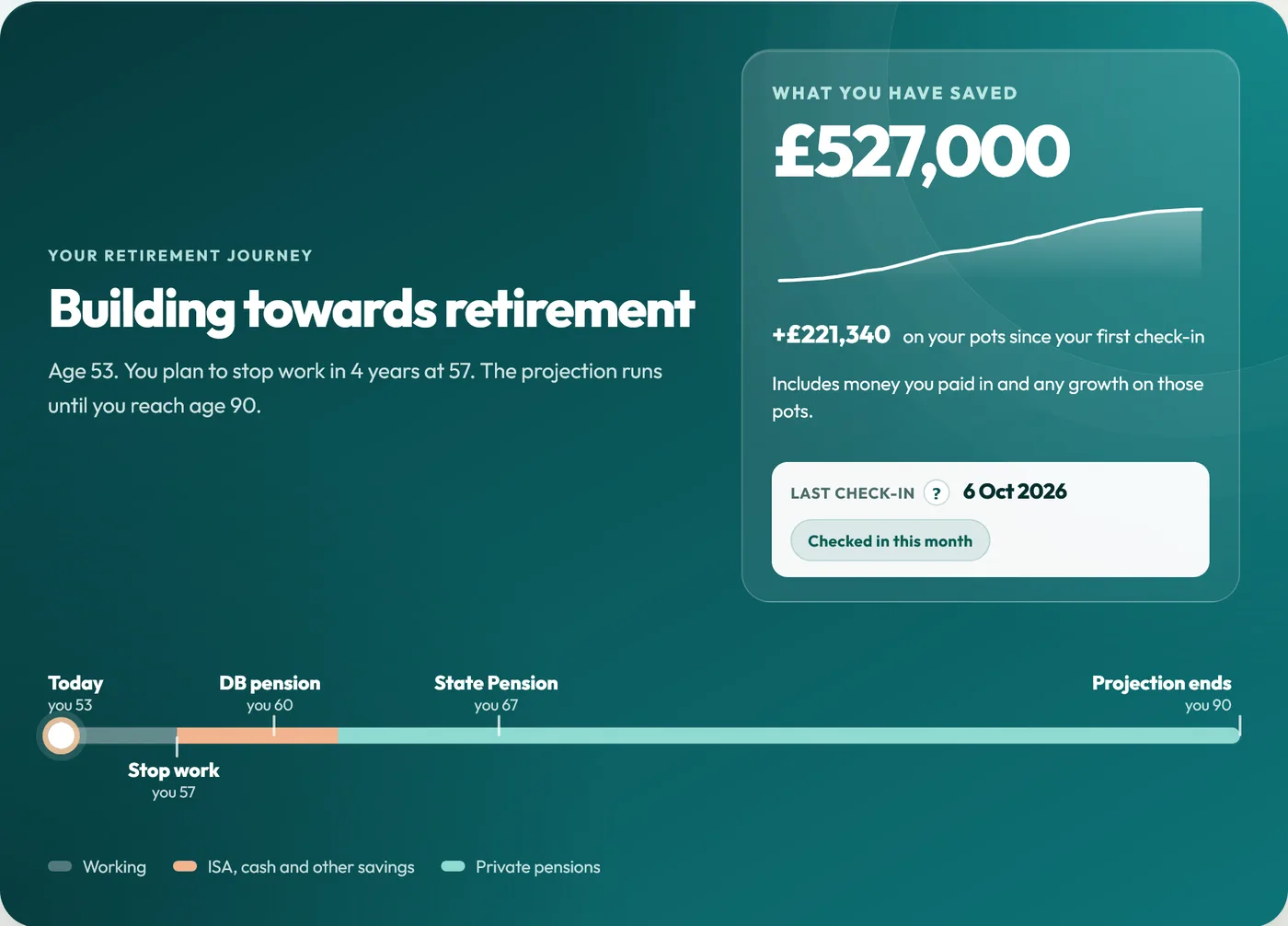
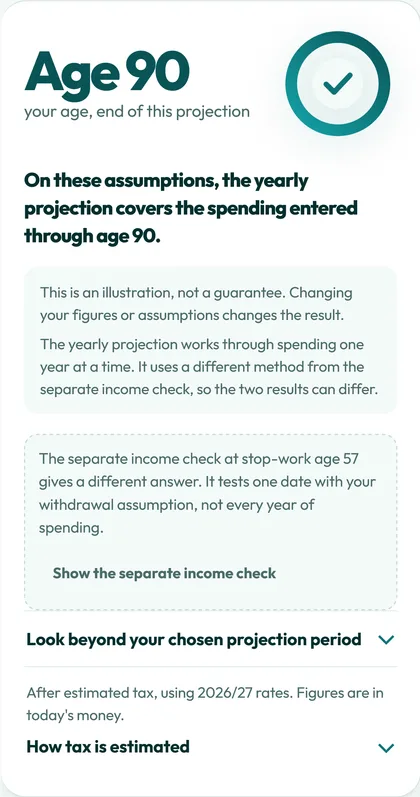
Built around the questions you actually ask, not a wall of inputs. The examples below use one sample plan: age 53, stopping work at 57 and spending £42,000 a year.
See which money pays for which years
Retirement usually comes in stages. Savings often bridge the gap until you can access your private pensions, then a defined benefit pension might start, then your State Pension.
Home lays out each stage with the yearly amounts, so you can see where the pressure falls and how long your money could cover your spending.
- When each income starts
- How much comes out of savings each year
- Spending covered to which age, on your assumptions
Check in, and see what actually changed
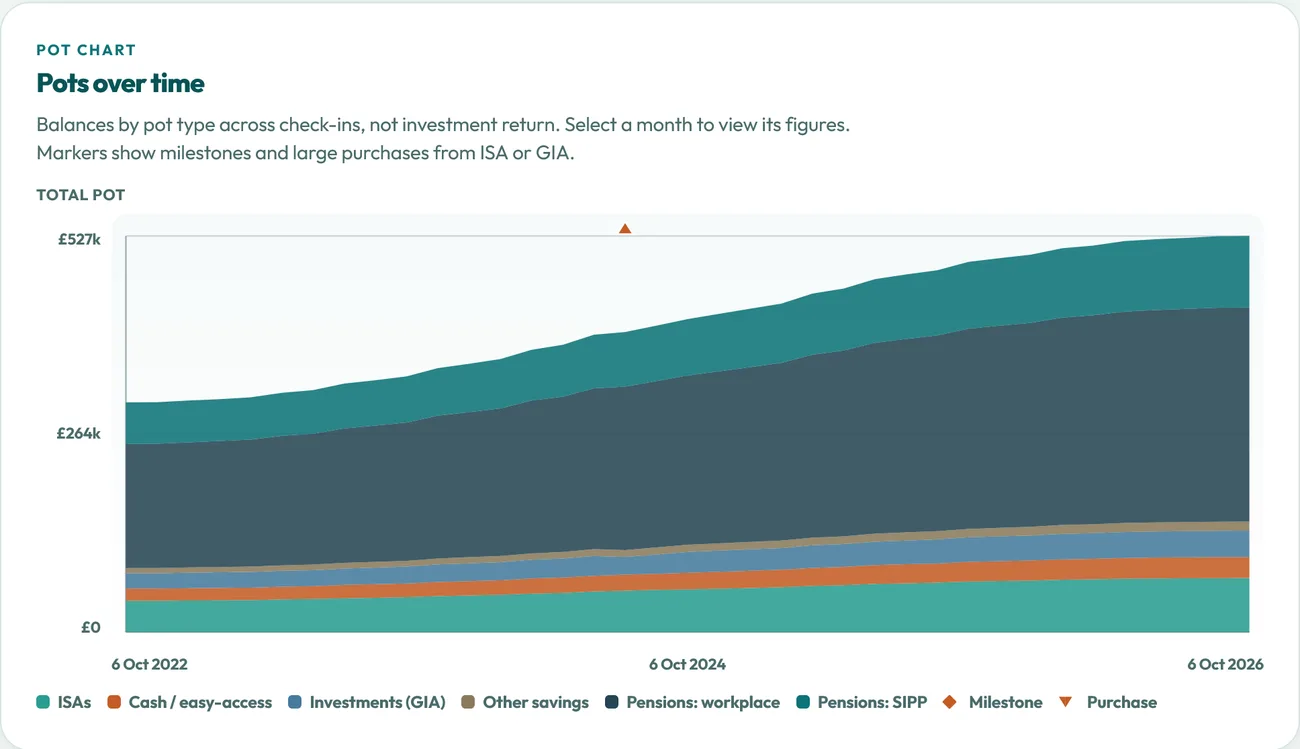
A check-in saves your figures for that month. Compare any two and Plan Hub shows what moved: your balances, your saving, your spending and how far the money is projected to last.
Check in when a pension statement arrives or something changes. Optional reminders help you keep your figures up to date.
- History charts from your second check-in
- Any two months side by side
- Optional check-in reminders
Try a change without touching your plan
- Stop-work age, spending, saving or pot sizes
- Up to 25 saved scenarios
- Your saved plan stays as it is
Pick one change, such as stopping work two years earlier or spending £4,000 more a year, and see it next to your saved plan.
Save the ones worth keeping, compare up to three side by side, and make one your plan when you are ready.

Find out where the plan is tight
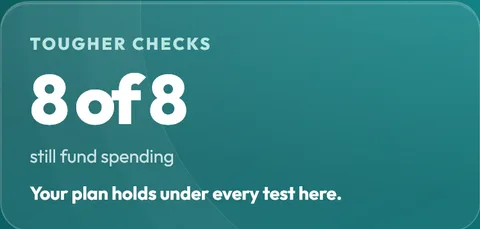
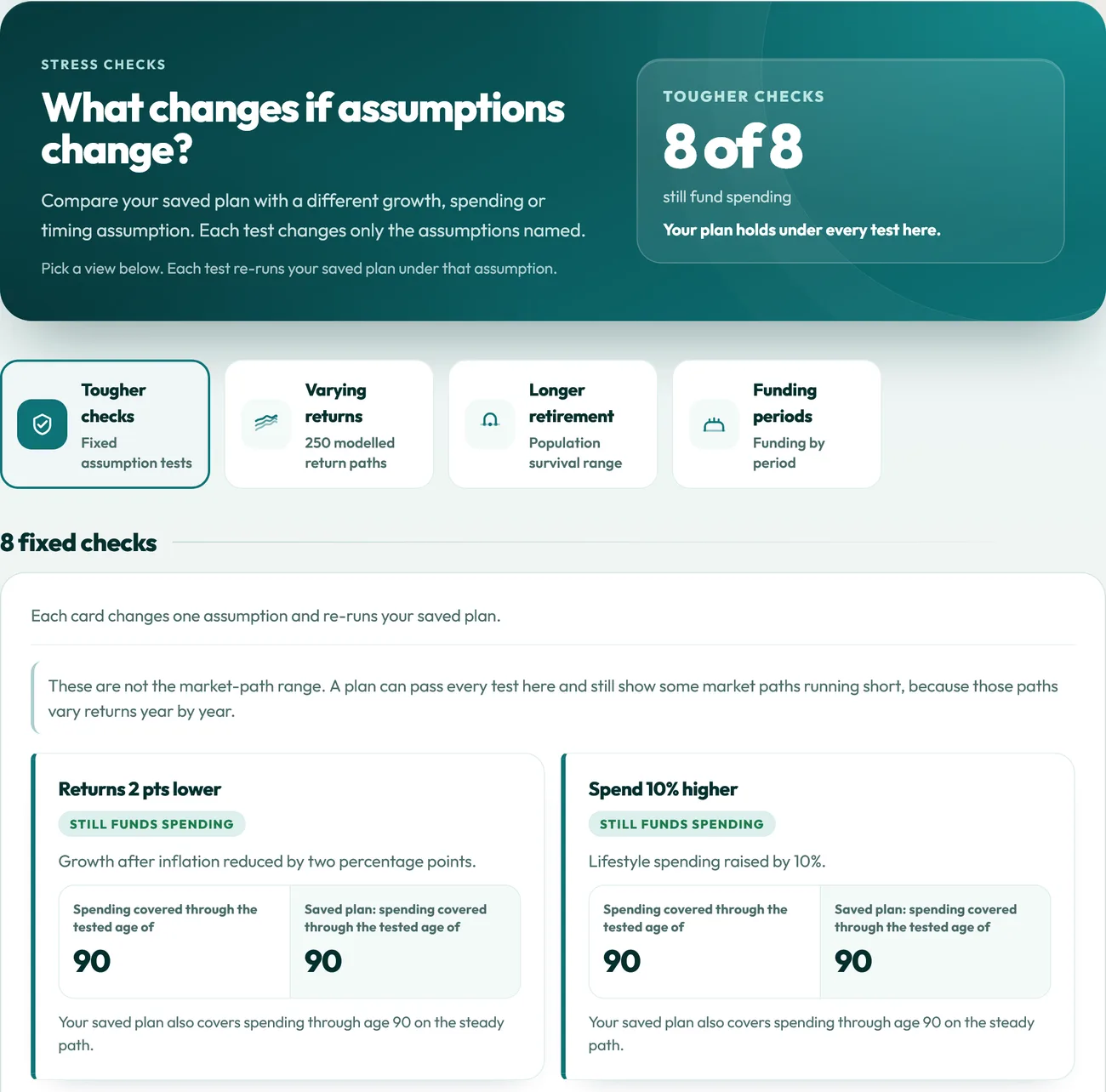
Eight tougher checks re-run your plan with one assumption changed at a time: lower returns, higher spending, a 20% fall in invested pots, later pension access, a £20,000 one-off cost and more.
See how different sequences of investment returns could affect how long your money lasts. A separate view runs 250 modelled market paths to show a range of possible outcomes. These are illustrations, not predictions.
- Each check changes one thing, so the cause is clear
- A check to age 100, plus figures on how long people tend to live
- Your saved plan is never altered
A clear summary to print or share
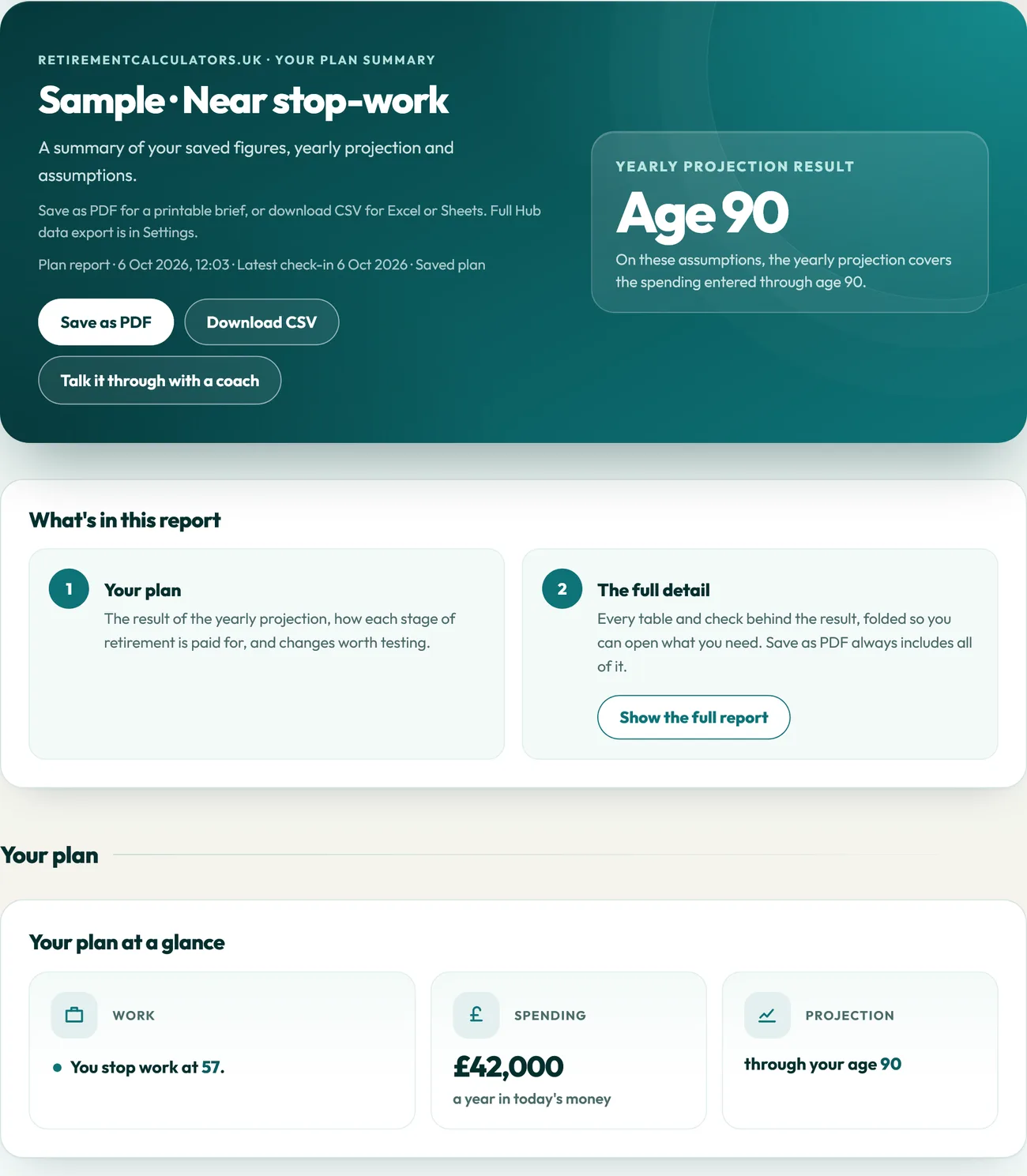
Save your plan as a PDF or download it as a CSV. The report covers the result, how each stage is funded, the assumptions used and what the model leaves out.
It is useful for a conversation with your partner, or with an adviser if you use one.
- Save as PDF or CSV
- Every assumption listed in plain English
- Full data export from Settings
It copes with the messy parts
Few retirements are one pension and a single date. Plan Hub is built for how plans actually look.
Couples and households
Plan together, with both sets of pensions and State Pension ages.
Pensions and savings together
Workplace pensions, SIPPs, defined benefit schemes, ISAs, cash and General Investment Accounts.
Changes along the way
Part-time work, other income, a spending change or one-off costs such as a new car.
Reminders to check in
Choose how often you want a nudge to update your figures.
Free calculators or Plan Hub?
Keep using the free tools. Plan Hub is for when you want continuity.
Free calculators
Free- Answer one focused question at a time
- Start fresh on each visit
- Good for exploring a single idea quickly
Plan Hub
Standard price £60, launch price £30 a year £30 a yearPaid membership is billed annually and renews automatically at £30 until you cancel.
- Holds your whole plan in one place
- Saves check-ins, so you can see progress
- Tests changes against the same plan
- Stress checks and a report you can print
Plenty of people use both: a calculator to explore one idea, then Plan Hub to see how it fits the whole plan.
One membership. Everything included.
No tiers and no features held back. You get the whole Hub for a year.
Plan Hub membership
Launch priceStart with a 7-day free trial. No card needed.
When you’re ready, subscribe for £30 a year. The launch price stays yours while your paid membership remains active.
Paid membership is billed annually and renews automatically at £30 until you cancel. We email you before each renewal.
- Home, Plan, Journey, Scenarios, Stress checks and Report
- Up to 25 saved scenarios
- More than one named plan, such as a cautious and a hopeful version
- Check-ins with history charts and reminders
- PDF and CSV report downloads
- Tax-year figures updated as rules change
- Export or delete your data any time
- Help guides on every tab
Need help? Get in touch through our contact page with questions about using Plan Hub, your account or billing. We can explain how the tool works, but we cannot give personal financial advice.
Start your free trialCancel any time before renewal and keep access to the end of the year you paid for.
What happens next
From sign-up to your first scenario in one sitting.
- Create your account
Sign up once. Your plans stay behind your login. Your 7-day free trial starts straight away, with no card needed.
- Build your first plan
Add ages, spending and pots, then try your first scenario.
- Subscribe when you are ready
Subscribe from the Hub by card or digital wallet through Stripe. Your receipt arrives by email.
Who Plan Hub is for
It suits people who like to see the numbers for themselves. It is not the right tool for everyone.
A good fit if you
- have more than one pension or pot and want to see them together
- are working towards retirement, or have recently stopped and want to keep an eye on things
- like to see the trade-offs rather than be handed one answer
- want a plan you update a few times a year, not a one-off sum
Probably not for you if you
- want someone to tell you what to do. A regulated financial adviser is the right route for that.
- only need a quick answer to one question. Our free calculators may be all you need.
- want your accounts linked automatically. Plan Hub uses the figures you enter.
Questions people ask
Find out about pricing, getting started, your data and how Plan Hub differs from the free calculators.
What is Plan Hub?
Plan Hub is a saved retirement plan you can come back to. You add your pensions, savings, State Pension and spending once. It then shows how each stage of retirement could be funded, keeps a record each time you check in, and lets you test changes against the same plan.
How much does Plan Hub cost?
You can start with a 7-day free trial, with no card needed. The trial does not turn into a paid membership by itself. You only pay if you choose to subscribe. If you subscribe before your trial ends, payment is taken that day and your year starts then. At our launch price that is £30 a year while your paid membership remains active, equivalent to £2.50 a month, billed annually. The standard price is £60 a year. Paid membership renews automatically every year at £30 until you cancel. One payment gives you full access to every part of Plan Hub for the year.
What happens after my free trial?
Your plan stays saved and you can still sign in to view it. Nothing is charged, because no card is taken for the trial. To keep editing your plan, record check-ins and download reports, subscribe from the Hub when you are ready. You can also download a copy of your data from Settings, or delete it.
Can I cancel?
Yes. Cancel any time before your renewal date and you keep access until the end of the year you paid for.
What happens to my plans when my membership ends?
Your plans stay saved and you can still sign in to view them. You can download a copy of your data from Settings, or delete it. To edit your plan, record check-ins or download reports, you need to subscribe again. We keep your plans until you delete them. If you subscribe again later, you pay the price on offer at that time.
What do I need to get started?
Rough figures are fine: your age, when you might stop work, what you expect to spend each year, and the balances of your pensions and savings. Your State Pension forecast from gov.uk/check-state-pension helps too. You can sharpen the figures later.
Can I plan as a couple?
Yes. You can plan on your own or as a household, with each person’s ages, pensions and State Pension included.
Does it connect to my bank or pension accounts?
No. You type in the figures you want to include. There are no bank or pension logins, and nothing is pulled from your accounts.
How is tax worked out?
Income Tax is estimated year by year using 2026/27 rates, with Scottish rates if you choose them. It is an estimate rather than a full tax calculation, and the Report lists what the model simplifies.
Is this regulated financial advice?
No. Plan Hub models the figures you enter so you can explore trade-offs. Decisions about money stay with you, or with a regulated adviser if you use one.
What happens to my data?
Your plan sits behind your own login and is not public. You can export your data or delete your account from Settings at any time. Card payments are handled by Stripe, so your full card number is never stored on our servers.
How is this different from the free calculators?
Each free calculator answers one focused question, and you start fresh each time. Plan Hub keeps your whole plan together, saves your check-ins and lets you test changes without rebuilding anything. Plenty of people use both.
Bring the numbers you already know
Leave with a plan you can open again next month.
7-day free trial, no card needed · Subscribe for £30 a year when you’re ready · Paid membership renews automatically until you cancel · Planning figures only, not financial advice